See QuizMaster in Action
A powerful admin dashboard for teachers and a clean, focused interface for students
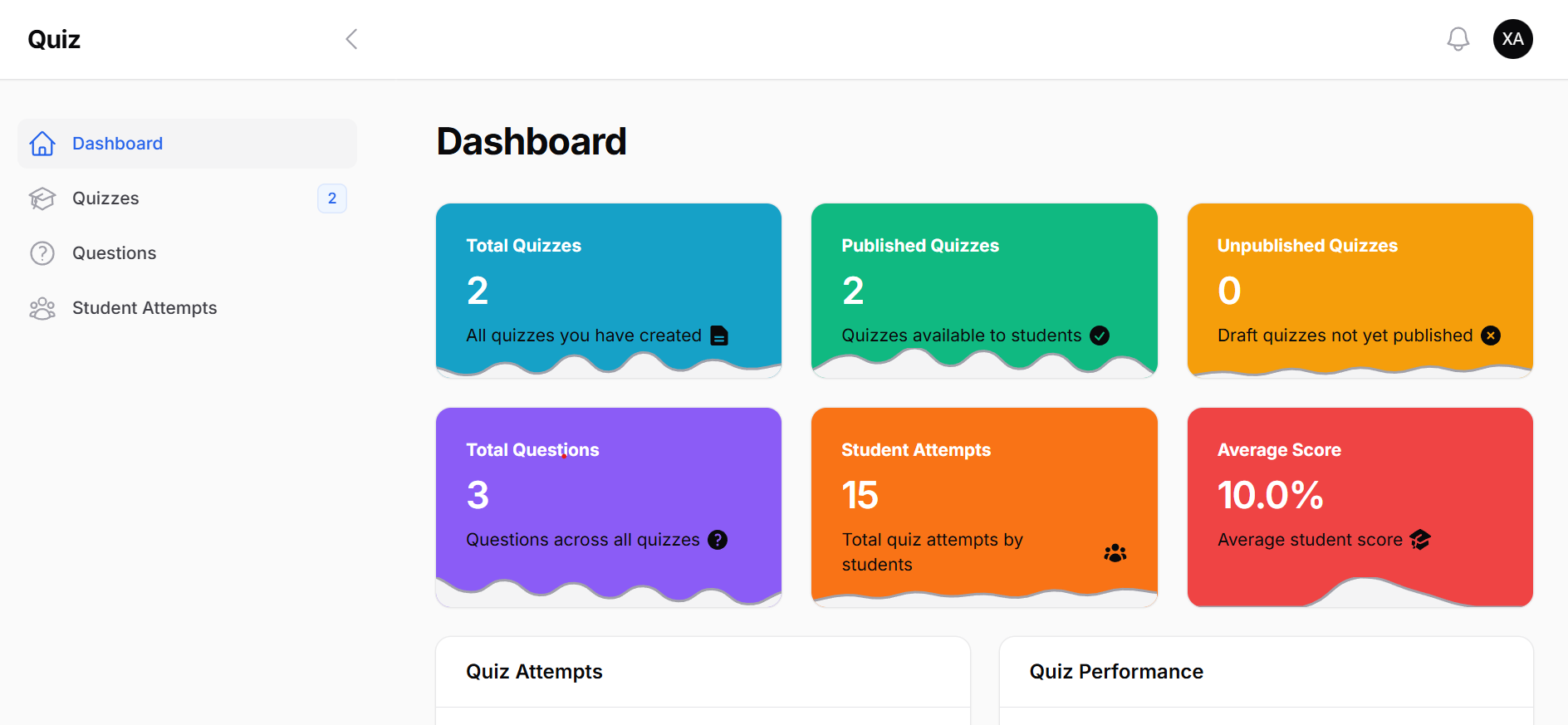
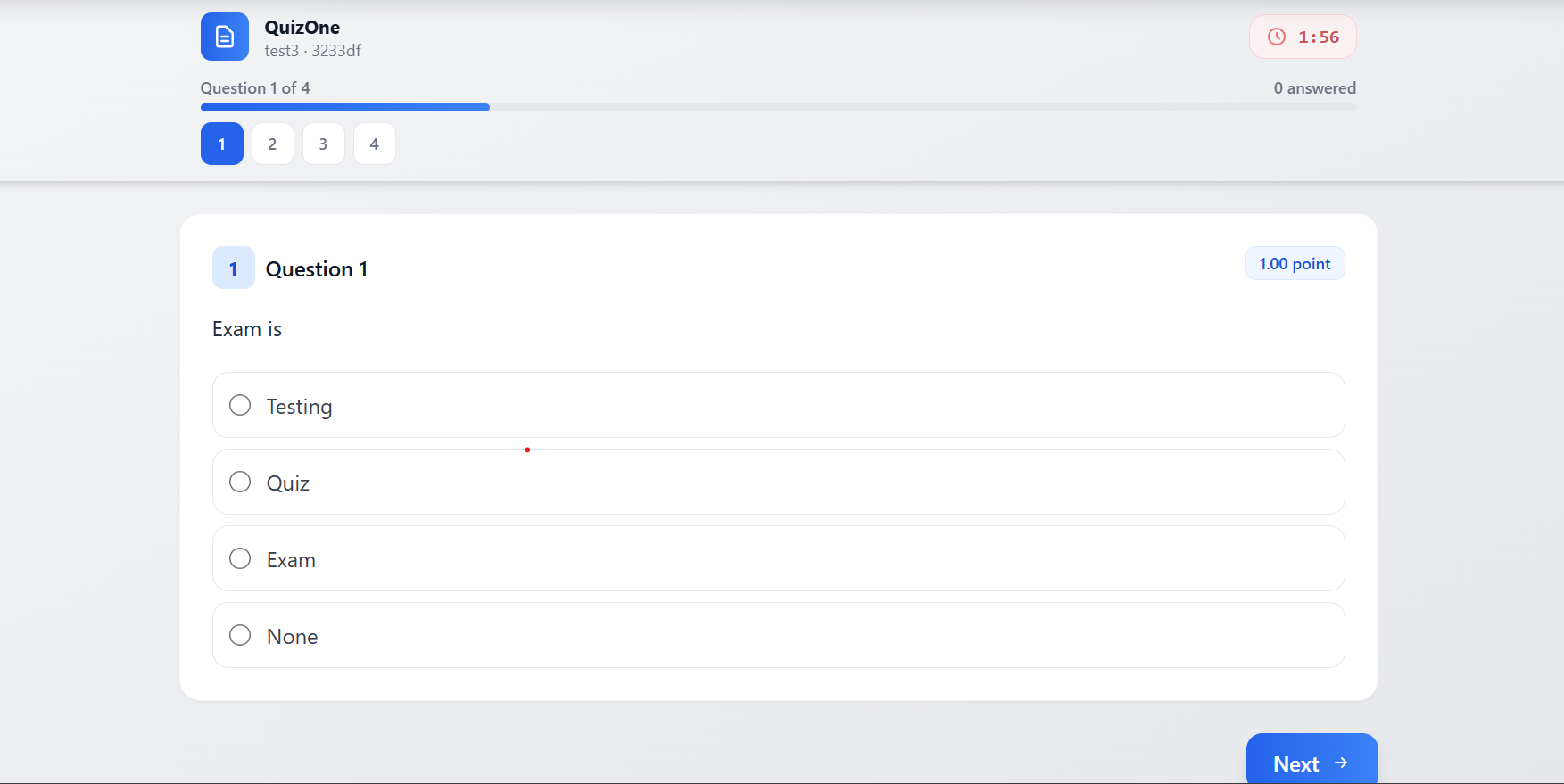
Create secure online quizzes with built-in proctoring, automatic grading, and comprehensive analytics. Trusted by educators worldwide.
Trusted by leading educational institutions
Get started in minutes with our simple 3-step process
Add questions using our intuitive editor. Choose from MCQ, True/False, Text, or Code Snippet types. Set time limits and security options.
Publish your quiz and share the unique link. Students register with their ID and start immediately. No app downloads required.
Quizzes are auto-graded instantly. View detailed analytics, track violations, and export results. All in real-time.
Powerful features designed for educators who demand security, efficiency, and insights.
Advanced anti-cheating measures including tab switching detection, window blur monitoring, and copy-paste blocking. Ensure academic integrity with every assessment.
MCQ, True/False, and text answers graded instantly. Save hours of manual work.
Track scores, pass rates, and student performance with beautiful charts.
MCQ, True/False, Text, and Code Snippet questions supported.
Set quiz duration and expiration dates. Auto-submit when time runs out.
Student answers are saved automatically. No work lost on refresh or disconnection.
A powerful admin dashboard for teachers and a clean, focused interface for students
See what teachers and institutions are saying about QuizMaster
"QuizMaster has transformed how I conduct assessments. The anti-cheating features give me confidence that results are genuine."
"Tab-switching detection caught several cheating attempts that would have gone unnoticed with other platforms."
"Setting up quizzes is incredibly fast, and students love the clean interface. Real-time analytics are amazing."
"QuizMaster has transformed how I conduct assessments. The anti-cheating features give me confidence that results are genuine."
"Tab-switching detection caught several cheating attempts that would have gone unnoticed with other platforms."
"Setting up quizzes is incredibly fast, and students love the clean interface. Real-time analytics are amazing."
"The proctoring features have significantly reduced cheating in my online exams. Highly recommended!"
"Our institution adopted QuizMaster and we saw immediate improvements in assessment integrity."
"Easy to deploy, no student downloads required. The browser-based approach is perfect for our setup."
"The proctoring features have significantly reduced cheating in my online exams. Highly recommended!"
"Our institution adopted QuizMaster and we saw immediate improvements in assessment integrity."
"Easy to deploy, no student downloads required. The browser-based approach is perfect for our setup."
See why educators are switching to QuizMaster
| Feature | QuizMaster | Google Forms | Paper-based |
|---|---|---|---|
| Tab-Switching Detection | |||
| Auto-Grading | |||
| Real-time Analytics | |||
| Copy-Paste Blocking | |||
| Time Limit Enforcement | |||
| Violation Logging | |||
| Mobile Responsive |
Our proctoring system detects and logs every suspicious activity. When violations exceed the threshold, the quiz is automatically submitted to maintain exam integrity.
Detects when students switch browser tabs or windows
Blocks copying questions or pasting answers from external sources
Every violation is logged with precise timestamp for review
Experience the student interface with this interactive demo
You scored out of
Join thousands of educators who trust QuizMaster for secure, efficient online testing.
Everything you need to know about QuizMaster
QuizMaster monitors browser activity during the quiz. It detects tab switching, window changes, copy-paste attempts, and right-click actions. You can configure how many violations are allowed before auto-submission, and all events are logged with timestamps for review.
No! QuizMaster is completely web-based. Students just need a browser and the quiz link. They enter their name and ID to start - no downloads, no accounts, no hassle.
QuizMaster supports Multiple Choice (single answer), True/False, Text/Short Answer, and Code Snippet questions. All types except free-text are auto-graded. You can assign different point values to each question.
QuizMaster auto-saves answers as students work. If they lose connection and return, they can continue from where they left off (as long as time hasn't expired). Their progress is preserved.
Yes! You can export results to CSV/Excel format with all student scores, individual answers, time taken, and violation logs. Perfect for record-keeping and further analysis.
QuizMaster offers a free tier for educators to get started. Create unlimited quizzes and assess your students with all core features included. Contact us for institutional licensing.